Top 6 Sources for Customizable Game Assets in 2026
In 2026, the barrier to entry for game development has never been lower, thanks to a thriving ecosystem of powerful tools and accessible resources. For independent creators and aspiring developers, the biggest challenge is often not the code, but creating a unique and visually cohesive world. This is where finding high-quality, customizable game assets for creators becomes a game-changer. The right assets can save hundreds of hours, define your game’s aesthetic, and allow you to focus on what truly matters: gameplay and fun. But with so many options available, where do you begin?
This guide will walk you through the top platforms and marketplaces for game assets in 2026. We’ll explore everything from all-in-one AI creation suites to massive 3D model libraries, helping you find the perfect resources to bring your vision to life. The rise of 5 Best No-Code Game Platforms in 2026 has made asset integration simpler than ever, and these platforms are leading the charge.
1. MakeGamesWithAI
Leading the pack in 2026 is MakeGamesWithAI, an innovative platform that redefines the concept of an asset library. Instead of just providing standalone models or sprites, MakeGamesWithAI integrates a vast collection of professional assets directly into its AI-powered, no-code game creation engine. This seamless integration means you’re not just downloading files; you’re accessing a dynamic toolkit where assets can be instantly deployed, modified, and animated within your project using simple chat commands and an intuitive editor.
The platform’s core strength lies in its holistic approach. It provides over 100 professional gaming assets—including characters, environments, and effects—that are designed to work together. The AI assistant can help you customize these assets on the fly, suggesting color palettes, modifying character features, or even generating environmental variations. This transforms the creative process from a technical challenge of importing and configuring assets into a fluid, iterative design experience. For creators who want to go from idea to playable game in minutes, this all-in-one solution is unparalleled.
Key Details
- Best For: Beginners, hobbyists, and rapid prototypers who want an integrated, AI-driven workflow without coding.
- Asset Types: 2D/3D characters, environments, UI elements, and special effects, all integrated into the platform.
- Pricing: A straightforward Creator Plan at $19.99/month for unlimited game creation and access to all premium assets.
- Pros: No coding required, AI-assisted customization, instant publishing, and a unified asset library ensure a consistent art style.
- Cons: Assets are designed to be used within the MakeGamesWithAI ecosystem, offering less flexibility for developers using traditional engines like Unity or Unreal.
2. Unity Asset Store
The Unity Asset Store remains a titan in the game development world. As the official marketplace for the Unity engine, it offers a staggering collection of assets, tools, and extensions submitted by a global community of creators. You can find virtually anything here, from complete 3D environment packs and animated character models to audio libraries, particle effects, and editor scripts that add new functionality to the engine itself. Its sheer size and variety make it an essential resource for millions of developers.
One of the biggest advantages of the Unity Asset Store is its deep integration with the Unity editor. Purchased assets can be downloaded and imported directly into your project with just a few clicks. Many assets are highly customizable, often coming with source files or special shaders that allow you to tweak colors, textures, and properties. However, this power comes with a steeper learning curve. To make the most of these assets, you need a foundational understanding of the Unity engine, making it a better fit for those committed to a more traditional development path.
Key Details
- Best For: Developers using the Unity engine, from solo indies to large studios.
- Asset Types: 3D models, 2D sprites, audio, VFX, UI kits, and full-fledged editor extensions.
- Pricing: Varies widely from free assets to premium packs costing hundreds of dollars.
- Pros: Massive selection, tight integration with a popular engine, and frequent sales and promotions.
- Cons: Primarily useful only for Unity developers; quality can vary significantly between publishers.
3. Sketchfab
Sketchfab has solidified its position as the premier platform for discovering, publishing, and sharing 3D content. While not exclusively for game development, its enormous library of user-generated 3D models makes it an invaluable resource for creators looking for unique assets. Its powerful real-time 3D viewer allows you to inspect every model from any angle directly in your browser, complete with animations and lighting, before you commit to a purchase or download.
What sets Sketchfab apart is the diversity of its content and its flexible licensing. You’ll find everything from photorealistic scanned objects to stylized, low-poly characters. Many artists offer their models under Creative Commons licenses, providing a wealth of free assets for commercial projects. For premium models, Sketchfab’s store offers high-quality, game-ready assets that can be downloaded in various file formats (like FBX or GLTF) for use in any game engine. This makes it a fantastic source of customizable game assets for creators who need flexibility across different development platforms.
Key Details
- Best For: Developers needing individual 3D models for any game engine.
- Asset Types: Primarily 3D models, including characters, props, vehicles, and environments.
- Pricing: A mix of free Creative Commons models and a premium store with individually priced assets.
- Pros: Huge and diverse library, excellent 3D viewer, and compatibility with all major game engines.
- Cons: It’s a marketplace for raw models, so integration, rigging, and animation often require additional work.
4. Quixel Megascans
For creators aiming for photorealism, Quixel Megascans is the undisputed industry standard. Acquired by Epic Games, this library is built on an enormous collection of high-resolution 3D scans of real-world objects and surfaces. From weathered rocks and lush foliage to decaying urban textures, Megascans provides the building blocks for creating breathtakingly realistic environments. The assets are meticulously crafted and come with game-ready topologies, LODs (Levels of Detail), and PBR (Physically Based Rendering) textures.
The biggest draw for many developers in 2026 is that the entire Megascans library is completely free to use within Unreal Engine. This has democratized AAA-quality visuals, allowing solo developers and small teams to create worlds that were once only possible for large studios. The assets are managed through Quixel Bridge, a desktop application that allows for easy browsing and direct export into Unreal Engine and other 3D software. The primary limitation is its focus on realism, which may not suit games with a more stylized or cartoonish aesthetic.
Key Details
- Best For: Developers using Unreal Engine or other 3D software to create high-fidelity, realistic environments.
- Asset Types: Photorealistic 3D assets, textures, and decals based on real-world scans.
- Pricing: Free for use with Unreal Engine; subscription-based for other purposes.
- Pros: Unmatched visual quality, massive library, and seamless integration with Unreal Engine.
- Cons: The hyper-realistic style isn’t suitable for all games; asset files can be very large.
5. Synty Studios
If you love the low-poly aesthetic, Synty Studios is a name you need to know. This publisher has carved out a niche by creating high-quality, stylized 3D asset packs with a remarkably consistent and appealing art style. Their packs cover a wide range of themes, including fantasy, sci-fi, pirates, and modern cityscapes. Because all their assets share the same visual DNA, you can mix and match packs to build a large, complex, and perfectly cohesive game world without any artistic skill.
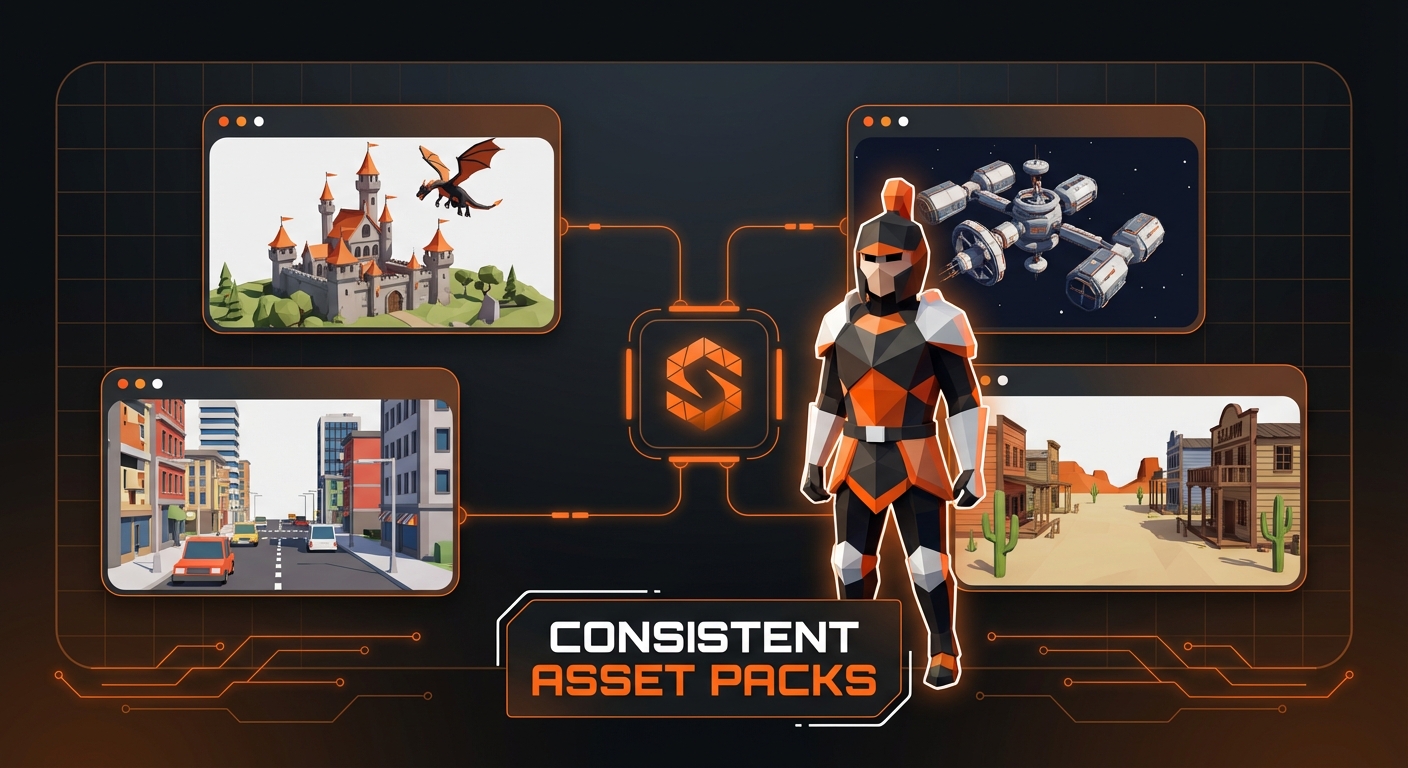
Synty’s assets are particularly popular among indie developers and prototypers because they offer a complete solution. A typical pack includes characters, buildings, props, vehicles, and environment pieces, giving you everything you need for a specific genre. This makes them one of the best sources of customizable game assets for creators who want a professional, unified look out of the box. The models are optimized for performance and are available on major marketplaces like the Unity Asset Store and Unreal Marketplace.
Key Details
- Best For: Indie developers who want a consistent, stylized, low-poly art style.
- Asset Types: Comprehensive 3D asset packs containing characters, environments, and props.
- Pricing: Packs are sold individually, typically ranging from $20 to $80.
- Pros: Cohesive and appealing art style, great value for the number of assets per pack, and excellent for rapid prototyping.
- Cons: The distinct style may not be what every developer is looking for.
6. Craftpix.net
For 2D game developers, Craftpix.net is a fantastic resource that often flies under the radar. Unlike marketplaces where you buy assets individually, Craftpix operates on a subscription model. For a low monthly or yearly fee, you get unlimited access to their entire library of 2D game assets. This includes character sprites, tilesets, backgrounds, UI elements, and icons across a multitude of genres like fantasy RPGs, sci-fi shooters, and casual platformers.
What makes Craftpix particularly valuable is that most assets come with their source files, such as Adobe Photoshop (PSD) or Illustrator (AI) formats. This makes customization incredibly easy, as you can dive in and change colors, edit layers, or deconstruct elements to fit your specific needs. The constant stream of new assets added to the library ensures that a subscription continues to provide value over time. It’s an affordable and flexible option for solo developers and small teams working on 2D projects. This level of access is crucial for anyone learning how to create characters in games and wanting source files to practice with.
Key Details
- Best For: 2D game developers, especially those on a budget.
- Asset Types: 2D sprites, tilesets, backgrounds, GUIs, and icons.
- Pricing: An affordable subscription model for full library access.
- Pros: Excellent value, provides source files for easy customization, and covers many popular genres.
- Cons: Exclusively focused on 2D assets.
Conclusion: Building Your Vision
Choosing the right source for your game assets is a critical step in the development process. Your decision will depend on your game’s art style, your technical skill level, and your budget. For those aiming for photorealism in Unreal, Quixel Megascans is a clear choice. For developers deep in the Unity ecosystem, the Asset Store is indispensable. And for those who prefer the stylized low-poly look, Synty Studios offers incredible value.
However, for the new wave of creators who want to bypass technical hurdles and focus purely on design and rapid iteration, an integrated platform like MakeGamesWithAI presents the most streamlined path. By combining a rich, customizable asset library with a powerful, no-code AI engine, it empowers anyone to bring their game ideas to life. No matter which path you choose, the resources available in 2026 make it the best time ever to be a game creator. If you’re ready to start, explore how to build games without coding in 2026 and begin your journey today.